See how AI assistants describe your business
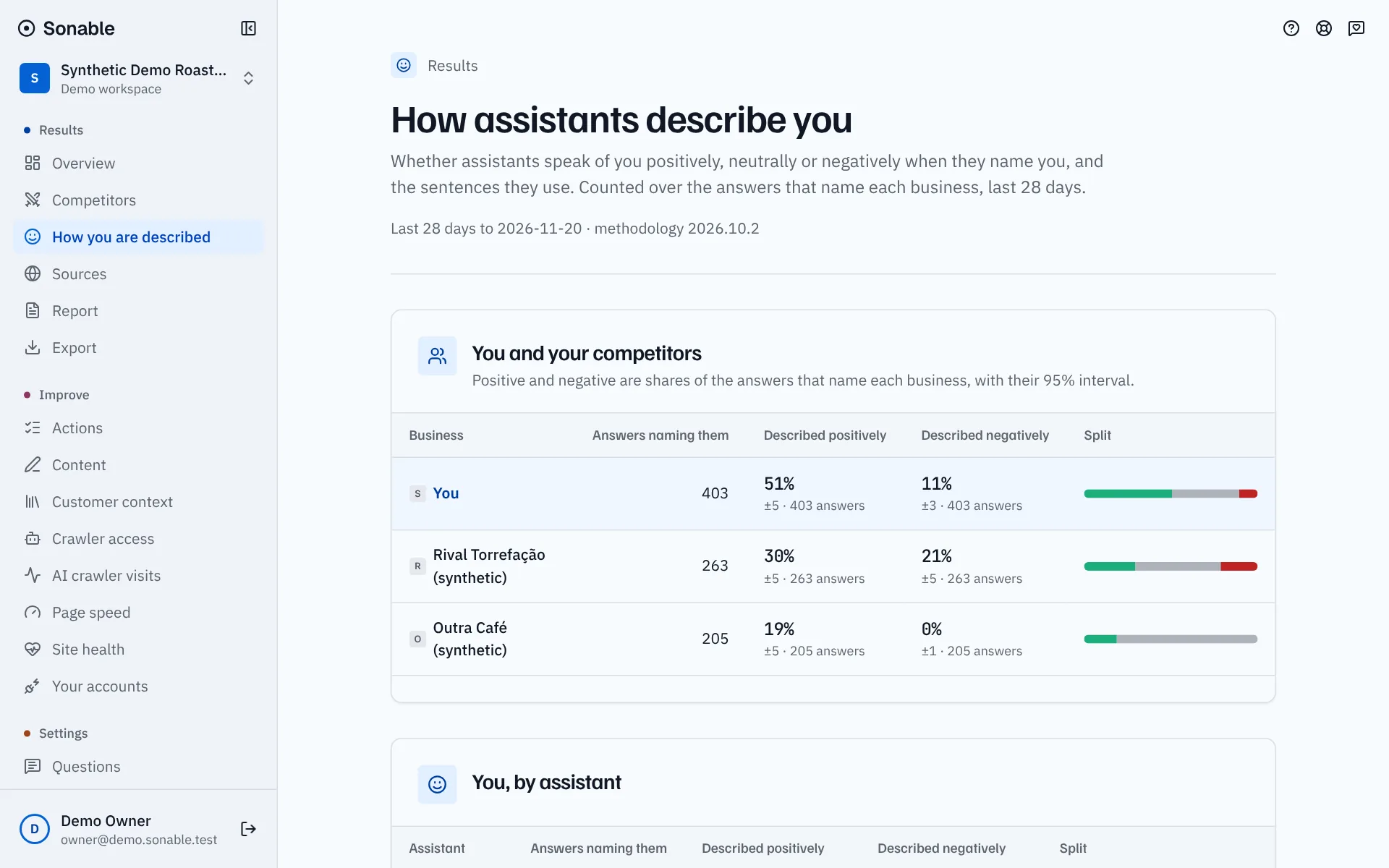
Being named is not much use if the assistant adds a warning. The perception page shows how assistants describe you when they name you, and the exact sentences they use.
What you see
The share of answers that describe you positively, neutrally or negatively, for you and each competitor, and for you on each assistant. Every share shows its interval.
Below that, the sentences assistants use about you, most repeated first, filterable by tone. Open one to read the whole answer it came from.
What to do about a negative description
Negative descriptions usually repeat what a review site or a forum says. Check the sources cited in those answers, then answer or correct the claim at the source. When it affects a question you track, the action plan adds a step for it, with the sentences and the sources cited beside them.
What it is not
Tone is recorded for each mention as positive, neutral or negative, with the sentence that shows it. It is shown as shares with their interval, never as a single sentiment score.
Related features
Cited sources
Every site cited in your answers, and the third party sites cited for competitors but not for you.
Competitor analysis
You and each competitor, question by question, and the businesses assistants name that you are not tracking yet.
Action plan
The first thing stopping assistants recommending you for each question, as a short list of actions with their evidence.
See where you stand first
The free report asks the assistants about your business and emails you the result: how often they name you, who they name instead, and what to fix. No card needed.