Turn the questions you lose into content briefs and WordPress drafts
The content page starts from the questions where you are named least, and builds each brief from what the assistants actually said, cited and searched for.
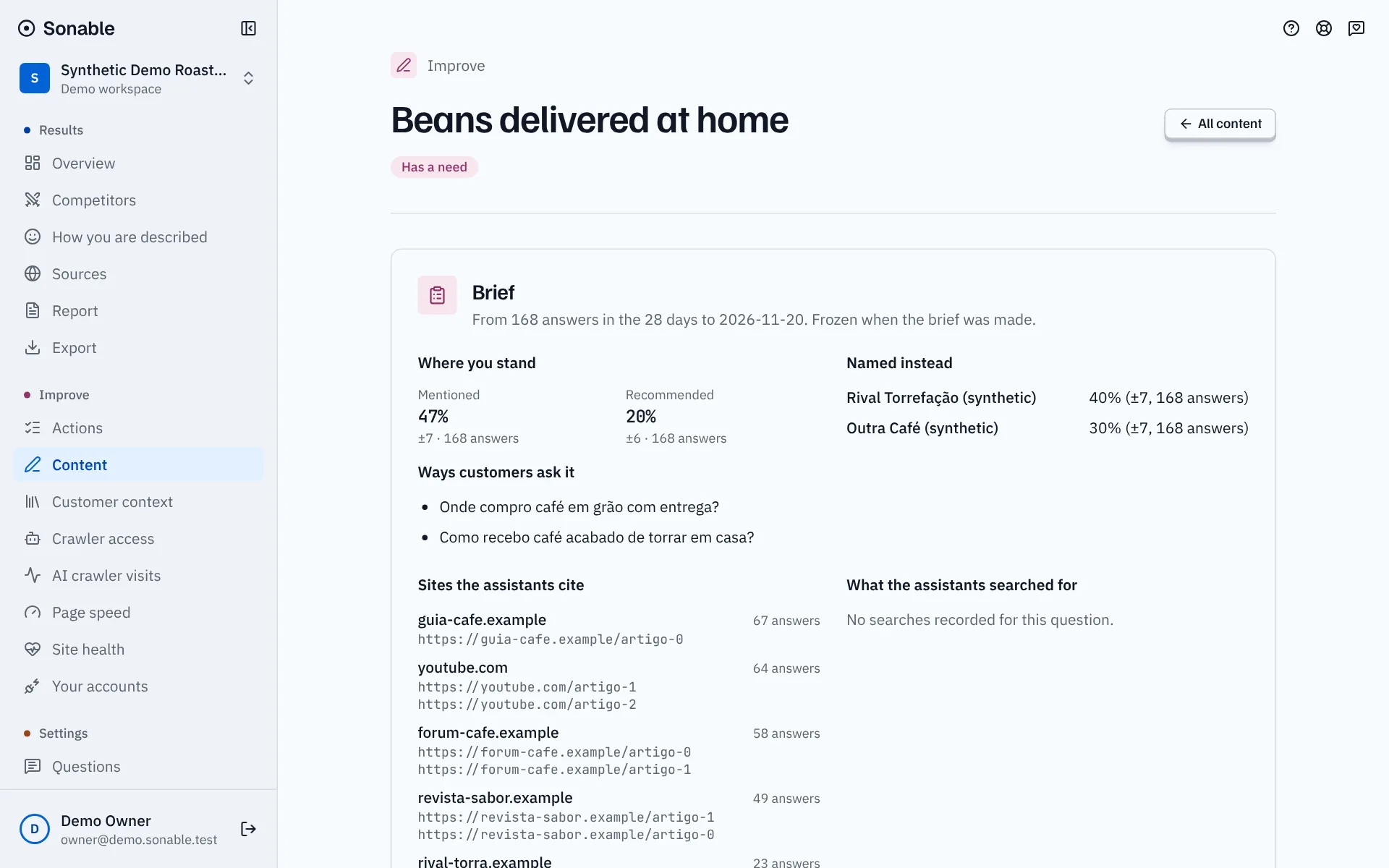
Briefs
A brief freezes what the latest 28 days of answers show for one question: where you stand, who the assistants name instead, the sites they cite (including those cited where a competitor is recommended and you are not), what they searched for, and the ways customers ask it.
Drafts
A draft has a title, a meta description and the text in Markdown, written by AI from the brief, your brand profile and your customer context. Anything about your business that those do not support is marked [to check: …] rather than made up. Check every claim before you publish.
WordPress
Connect a WordPress site with an application password, which is stored encrypted and can be revoked in WordPress at any time. Send as a draft puts the title, text and meta description into a draft post. Sonable never publishes, and never changes a post once it has left draft.
Related features
Customer context
Call notes, transcripts, tickets and help centre pages, so drafts answer real questions in your customers’ words.
Cited sources
Every site cited in your answers, and the third party sites cited for competitors but not for you.
Question topics
Figures pooled by topic and buying stage, and every question in detail, down to each answer.
See where you stand first
The free report asks the assistants about your business and emails you the result: how often they name you, who they name instead, and what to fix. No card needed.